Setup Checklist
The setup checklist is a personalized guide that helps you complete essential tasks when you first join Administrate.dev.
How It Works
When you sign in, you'll see a progress indicator in the sidebar:
Click it to view the full checklist at /app/onboarding:
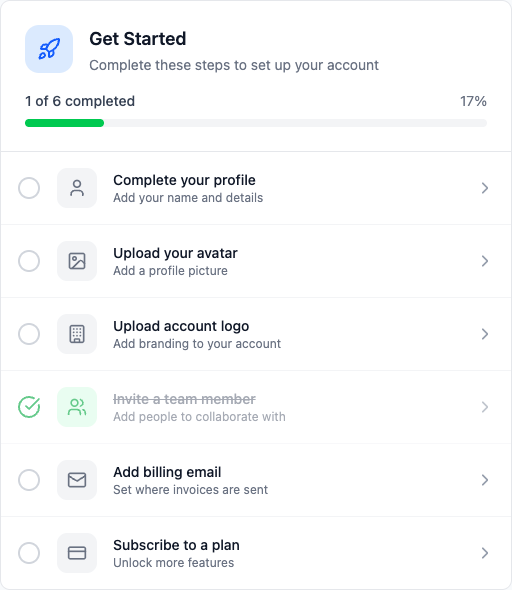
Each checklist item:
- Shows a title and description of the task
- Links directly to where you can complete it
- Gets automatically checked when you finish
Role-Based Items
The checklist is tailored to your role in the organization.
All Members See:
- Complete your profile
- Upload your avatar
- Add a company
- Add an n8n instance
Admins Also See:
- Upload organization logo
- Invite team members
- Track LLM spend for a company (connect an LLM provider)
- Create API tokens (if enabled)
Owners Also See:
- Add billing email
- Subscribe to a plan
Key Setup Tasks
Add a Company - This is your first step. Create a company record to represent an organization you're managing n8n workflows for.
Add an n8n Instance - Connect your n8n deployment by providing its URL and API key. The system will automatically sync workflows and executions.
Track LLM Spend - If you want to track AI costs, connect an LLM provider (OpenAI, Anthropic, etc.) and assign projects to companies.
Progress Tracking
The sidebar widget shows:
- A circular progress indicator
- Number of completed items vs total
- Quick access to the full checklist
Dismissing the Checklist
Once you're comfortable with the platform, you can dismiss it:
- Hover over the checklist widget in the sidebar
- Click the X button
- Confirm you want to hide it
The checklist won't appear again unless you restore it.
Restoring the Checklist
If you dismissed the checklist but want it back, you can restore it from Preferences.