Welcome to Administrate.dev
Administrate.dev is a monitoring dashboard for tracking n8n workflow executions and LLM costs across multiple companies. Here's how to get started.
The Setup Checklist
When you first sign in, you'll see a setup checklist in the sidebar:
Click it to open the full checklist. Items vary by your role:
- Complete your profile
- Upload your avatar
- Add a company
- Add an n8n instance
- Track LLM spend for a company (if enabled)
- Invite team members (admins and owners only)
- Set up billing (owners only)
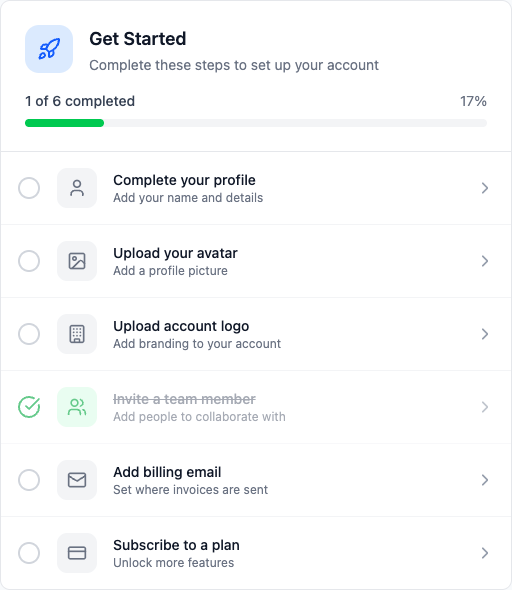
Click any item to go to that task. Items get marked complete automatically.
Step 1: Add Your First Company
Companies represent the organizations you're managing n8n workflows for. Go to Companies and click Add Company:
- Enter the company name
- Add a short code (used for identification)
- Optionally add contact details and timezone
- Click Create Company
Step 2: Connect an n8n Instance
Each company can have multiple n8n instances. Go to n8n Instances and click Add Instance:
- Select the company
- Enter a name for this instance
- Enter the base URL (e.g.,
https://n8n.yourcompany.com) - Enter your n8n API key
- Click Create Instance
The system will immediately sync workflows and start tracking executions.
Step 3: View the Dashboard
Once data starts syncing, you'll see:
- Overview - High-level metrics across all companies
- Workflows - All workflows with execution stats
- Errors - Failed executions that need attention
- Sync Health - Status of data synchronization
Optional: Track LLM Costs
If you're using AI in your workflows, connect LLM providers to track costs:
- Go to LLM Providers
- Connect your OpenAI, Anthropic, or other provider
- Assign projects to companies to attribute costs
Stuck?
Browse our other help articles or contact support.