Build Whatever You Need on Your Data
Full REST API with granular permissions, rate limiting, and IP allowlisting. Pull execution data into your billing system, build custom client portals, or automate reports.
Why You Need API Access
Your monitoring data should work where you need it.
Data Locked in the UI
Your monitoring data sits in a dashboard but you can't pull it into your billing system, your client portal, or your custom reports without manual export.
Manual Data Entry
Copying execution counts and LLM costs into spreadsheets or invoicing software every month. That's hours of tedious work that could be automated.
No Custom Integrations
You want to trigger actions based on monitoring data - update a ticket when a workflow fails, send a weekly report to clients - but there's no way to connect the pieces.
A Proper API, Not an Afterthought
Everything you need to build reliable integrations.
Full REST API
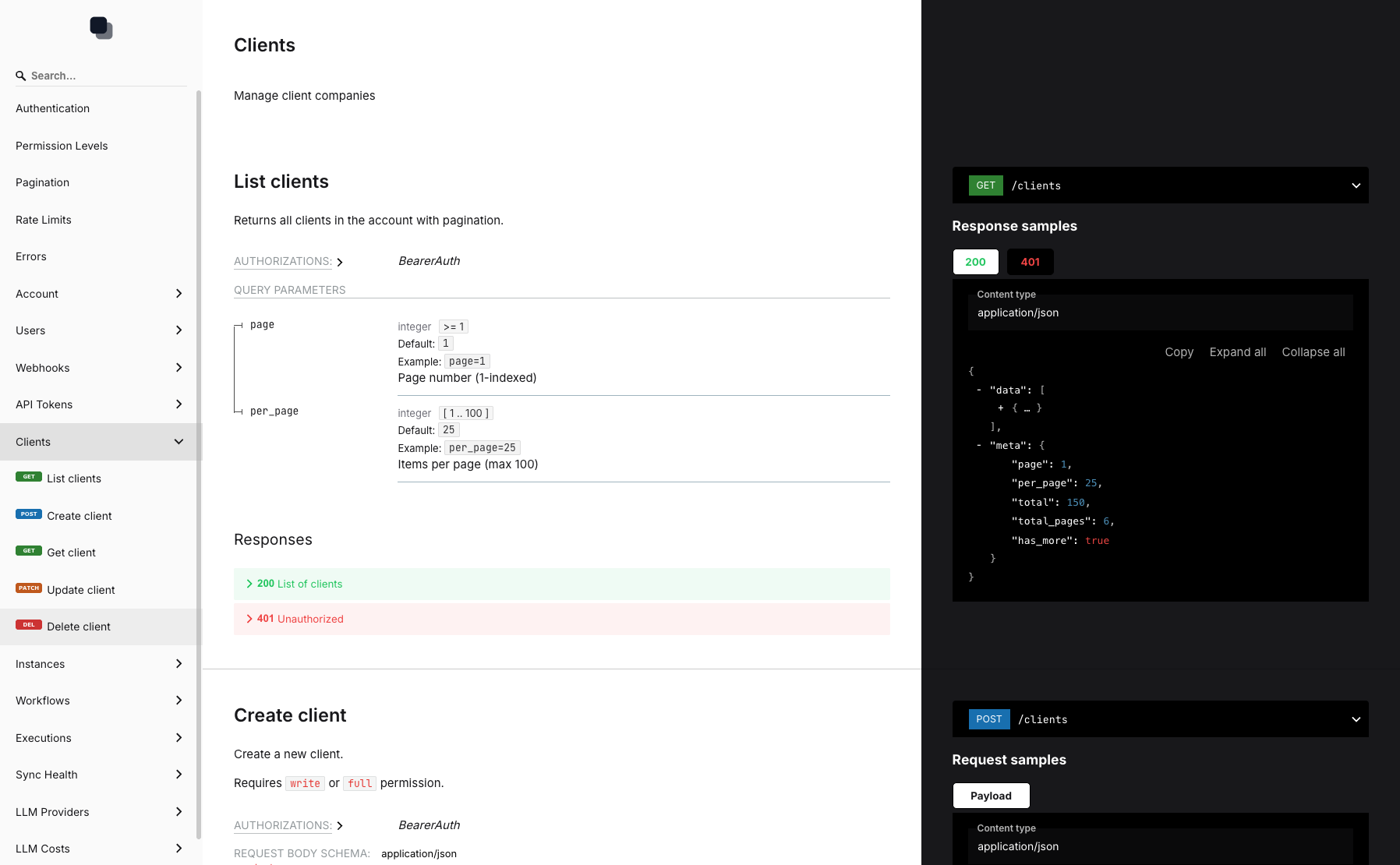
Every resource in Administrate is available via API: clients, instances, workflows, executions, LLM costs, sync runs, and webhooks. JSON responses, standard HTTP methods.
OpenAPI Documentation
Interactive API docs with request/response examples. Test endpoints directly from your browser. Available at /developers when logged in.
Granular Permissions
Create API tokens with read, write, or full access. Different tokens for different integrations - billing gets read-only, your custom dashboard gets write access.
Rate Limiting by Plan
Fair rate limits that scale with your plan. Free: 60 req/min, Pro: 500 req/min, Enterprise: 10,000 req/min. Enough headroom for any integration.
IP Allowlisting
Restrict API access to specific IP addresses or CIDR ranges. Lock down your tokens to only work from your servers.
Token Expiration
Set tokens to expire after 30, 60, 90 days, or 1 year. Automatically rotate access without manual intervention.
Developer-Friendly from Day One
Interactive docs, clear examples, and predictable behavior.
API Documentation
Interactive docs with request examples and live testing
API Tokens
Create and manage tokens with granular permissions
Usage Tracking
See when tokens were last used and request counts
Start Integrating in Minutes
Create API Token
Choose permission level and optional expiration
Read the Docs
Interactive documentation at /developers
Make Requests
Bearer token auth, JSON responses, standard REST
Frequently Asked Questions
What data can I access via the API?
What authentication does the API use?
What are the permission levels?
How do rate limits work?
Can I restrict API access by IP?
What happens when a token expires?
Your Data, Your Way
Create an API token and start building custom integrations today.